
Termius - Modern SSH Client
Termius CorporationBusiness
4.72.48K Reviews
- Version
- 7.8.2
- Installs
- 1.00M
- Age Rating
- Everyone
Screenshots
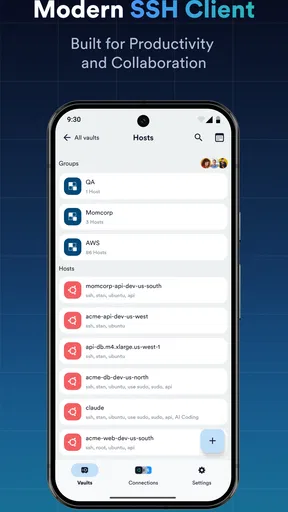
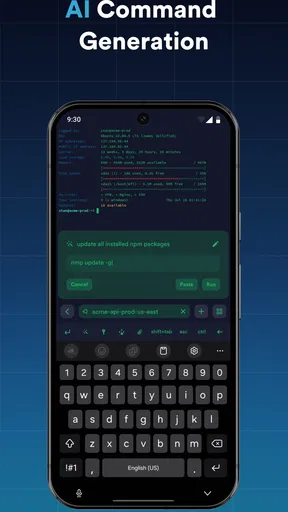
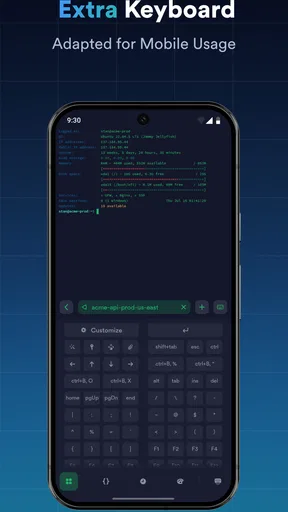
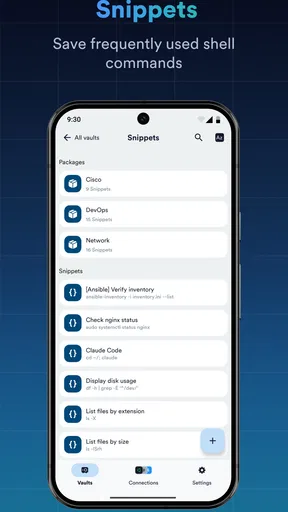
Our Review of Termius - Modern SSH Client
 Analysis by Appyee
My first-week reaction to Termius is that it makes remote access feel less like a chore and more like a routine I can keep up with. A good mobile SSH client has to do more than open a terminal: it needs to make saved connections easy to find, keep the screen usable, and avoid turning a quick check into a fiddly session. Termius gets a lot of that balance right, especially if you already work with remote machines and want access close at hand.
That convenience is the hook, but it is not the whole reason to keep an app around. I judge tools like this by what happens after the first few connections: whether they fit the way I organize work, whether I can trust my saved setup, and whether I still reach for them when a laptop would be more comfortable. Termius is a business app from Termius Corporation, and its strongest case is as a practical companion to existing server work rather than a replacement for every desktop workflow.
A smoother first week of remote access
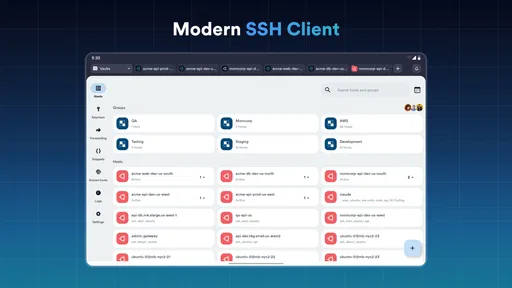
The first useful step is to give hosts clear names and group them by purpose, such as personal projects, staging systems, or machines you only touch occasionally. That small bit of organization pays off on a phone, where scrolling through an unstructured list quickly becomes annoying. When an urgent check comes up, a recognizable label is safer than guessing from an address you barely remember.
Termius supports SSH, SFTP, Telnet, and Mosh, so it can cover more than one kind of remote session. That breadth is handy if your work involves older equipment or different connection methods, though it does not mean every protocol is equally relevant to every user. If SSH is all you need, the extra choices can simply stay in the background.
Value that shows up in recurring work
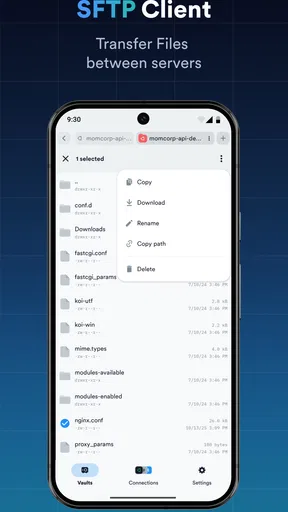
The app’s month-to-month value comes from repeat tasks: checking whether a service is responding, looking at a log, running a familiar command, or moving a file without opening a laptop. SFTP is especially useful for small, targeted transfers. I would still use a fuller desktop file manager for a large batch of files or a complicated directory cleanup, but for retrieving one configuration file or placing a corrected script, a phone can be enough.
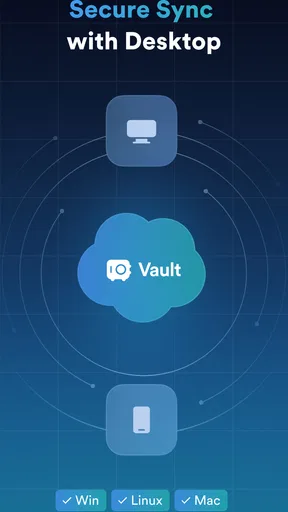
Cross-device syncing can also reduce setup friction when you move between screens. The practical benefit is not merely having the same host list everywhere; it is avoiding a separate, error-prone record of connection details. I would treat synchronization as a convenience, not as a substitute for keeping credentials and access practices under control. Before relying on any mobile client for important work, make sure you understand how your own keys and authentication are managed.
Where mobile convenience meets maintenance
Termius is free to start, with in-app purchases ranging from $0.99 to $120.00 per item. Its average rating is 4.6 from around 40,000 ratings, and it has more than 1 million installs. Those figures suggest broad interest, but they do not tell me whether a paid option fits a particular workflow. I would begin with the free experience and decide only after identifying a recurring task that it does not handle the way I need.
The current version is 7.5.0, and the app is listed for devices running Android 8.0 or later. It is rated for Everyone. Those details make it straightforward to check basic compatibility, but the more important maintenance question is personal: will you keep host names, groups, and credentials organized as your access changes? A cluttered connection list can make even a capable client feel unreliable, so I would remove stale entries and use labels that still make sense months later.
When a different tool is the better fit
A phone is excellent for a quick inspection, a restart, or a short command while away from a desk; it is less pleasant for long sessions that require heavy typing, careful editing, or several terminal windows at once. In those cases, I would switch to a desktop SSH client rather than force mobile controls to do a job they are not suited for. Termius works best as an accessible extra doorway into remote systems, not as proof that a phone can replace a full workstation.
It is also not the right pick for someone who has no reason to connect to remote machines. The terminal-first design has little value if your work is ordinary browsing or office tasks, and the range of protocols can feel like unnecessary complexity if you only want a simple file-transfer utility. The app earns a place when SSH or another supported connection method is already part of your routine.
My long-term test is simple: after the novelty wears off, does opening the app save time without adding another system to maintain? Termius can pass that test if you use it for small, frequent jobs and keep its host list tidy. If you only connect once in a while, a desktop client you already know may be enough. For people who regularly need remote access away from a computer, the convenience is real, provided they keep expectations sensible and choose the right screen for the task.
First Impressions
So, I stumbled upon Termius while looking for a solid SSH client that could handle my somewhat chaotic work style. I downloaded it and right off the bat, the interface caught my eye. It’s sleek, modern, and doesn’t overwhelm you with unnecessary clutter. You know how some apps throw everything at you at once? Not here. Everything is where you’d expect it to be, making navigation a breeze.
Features Galore
Let’s get into the nitty-gritty of what Termius offers. For starters, this isn’t just another SSH client; it’s like a Swiss Army knife for sysadmins. You can manage UNIX and Linux systems, run commands, and develop software over SSH with a snap of your fingers.
One feature that really stands out is the ability to organize hosts into groups. This might sound trivial, but trust me, when you’re dealing with a bunch of servers, this is a lifesaver. Plus, the app syncs across all your devices. So whether you're on your laptop or phone, everything stays updated. No more emailing yourself notes or trying to remember which server was named what.
Security and Functionality
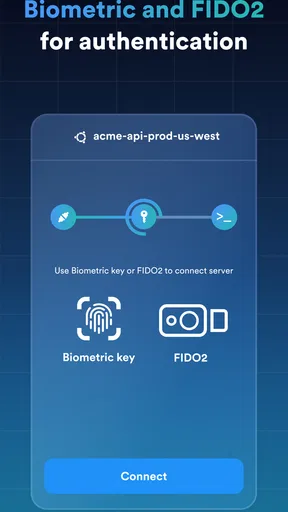
Security is a big deal, right? Well, Termius has you covered. It supports encrypted connections, and you can use two-factor authentication to keep your data safe. The app also lets you import your known_hosts and SSH keys, which is fantastic for those who like to keep things tight and secure.
What about functionality? The app supports SFTP, so transferring files between your local and remote systems is a walk in the park. It also offers a command-line interface with autocomplete, which is a godsend when you’re in the zone and can’t afford to slow down.
Performance on the Go
Now, I know what you’re thinking: how does it perform on mobile? Surprisingly well, actually. The mobile app is just as robust as the desktop version. I've used it on my Android, and the experience is seamless. It’s rare to find a mobile app that doesn't feel like a stripped-down version of its desktop counterpart, but Termius nails it.
Another cool feature is the terminal with support for 256 colors. It might sound like a small thing, but when you're used to working with a certain visual setup, having that consistency is comforting.
Wrapping It Up
So, what’s the verdict? Termius is a powerful, flexible, and user-friendly SSH client that makes managing remote systems easier than ever. Whether you’re a seasoned sysadmin or just starting out, this app has a lot to offer. It’s reliable, secure, and full of features that make your life simpler.
In a world where managing servers can sometimes feel overwhelming, Termius steps in as a breath of fresh air. Give it a shot, and you might just find it’s exactly what you’ve been missing in your tech arsenal.
Verdict
Strengths of Termius - Modern SSH Client
- User-friendly interface for easy navigation.
- Supports multiple platforms seamlessly.
- Robust security features for peace of mind.
- Customizable terminal settings.
- Offline capabilities for on-the-go access.
Limitations of Termius - Modern SSH Client
- Free version has limited features.
- Occasional connectivity issues.
- High subscription cost for premium features.
- No built-in scripting support.
- Limited customer support response.
Similar Picks in This Category
View All
LinkedIn: Community & Network
LinkedIn3.8

Zoom Workplace
zoom.com4.1

Microsoft Teams
Microsoft Corporation4.6

Meta Business Suite
Meta Platforms, Inc.4.6

Webex Meetings
Cisco Systems, Inc.4.5

TeamViewer Remote Control
TeamViewer4.4
Frequently Asked Questions
What platforms is Termius available on?
Termius is a versatile SSH client available on multiple platforms, including Android, iOS, Windows, macOS, and Linux. This cross-platform availability ensures that you can maintain consistent access to your servers and devices from virtually any device, making it a flexible choice for developers and IT professionals.
Does Termius support key-based authentication?
Yes, Termius supports key-based authentication, which enhances security by allowing users to authenticate using SSH keys instead of passwords. This method is preferred by many IT professionals for its added layer of security, as it eliminates the need for password management and reduces vulnerabilities associated with password attacks.
What are the main features of Termius?
Termius offers a range of features designed for efficient remote device management. Key features include multi-platform support, secure sync of credentials across devices, local terminal with bash, SSH key generation, SFTP support, and a command editor. These features make Termius a comprehensive tool for both casual users and professionals.
Is Termius free to use?
Termius offers both a free and a premium version. The free version includes basic SSH functionality, while the premium version, available through a subscription, unlocks advanced features such as cross-device sync, SFTP, and additional security options. Users can choose based on their specific needs and budget.
How secure is Termius for managing SSH connections?
Termius prioritizes security by offering encrypted sync of credentials, end-to-end encryption for data transfer, and support for key-based authentication. Users can rest assured that their connections are secure, making Termius a reliable choice for managing sensitive server and network operations.
